Cara Pasang CWM Di Android LG L3 II E435

Tutorial Cara Pasang/Instal CWM Ponsel LG L3 II E435-Apa kabar sobat seputar android.pada kesempatan kali ini saya ingin memberikan sedikit tutorial yang mungkin di butuhkan oleh para user Ponsel Android LG L3 IIE435 yang di mana tutorial ini untuk cara menginstal CWM Recovey pada LG L3 II E435.CWM Recovery merupakan sebuah aplikasi yang paling terkenal di dunia android.

Dengan kemudahan yang di miliki CWM recovery maka menjadi aplikasi utama yang paling di gemari Oleh Advance User atau pengguna tingkat tinggi.CWM Recovery juga banyak kegunaannya seperti Instal Custom Rom,Update Rom,Backup rom,Mengatasi Botloop.dan masih banyak lagi.

CWM Recovery paling sering di gunakan bagi para user yang suka mengoprek Androidnya.Jadi bagi pengguna LG L3 II E435 yang ingin mengoprek atau mengganti Custom Rom,terlebih dahulu installah CWM Recovery ini.
Cara Pasang CWM Di Android LG L3 II E435

Syarat-Syarat
  • Ponsel LG L3 II E435 Sudah dalam kondisi di root.
Tutorial/Langkah-langkah Instal CWM
  1. Pertama silahkan kalian download terlebih dahulu file instalernya di sini 
  2. Instal file Apk yang kamu download tadi.
  3. Lalu buka aplikasinya yaitu E435
  4. Lalu klik atau tap "Touch Here" Bila di minta izin di super user pilih yes allow.Tunggu beberapa saat.
  5. Jangan sentuh layar atau pun tombol samapi Ponsel LG OPTIMUS L3 II E435 merestart sendiri.
  6.  Selesai
 Kini ponsel Android LG L3 II E435 dual sim anda sudah terinstal CWM.Bagaimana mudah bukan cara instalnya.Tidak semua ponsel dapat menginstal CWM Recovery seperti tutorial di atas.Maka jangan lakukan tutorial di atas ke pada ponsel selain LG L3 II E435.

Saya rasa cukup sekian dulu tutorial kali ini semoga artikel ini bermanfaat bagi kalian semua.

Terimakasih Telah membaca :
Cara Pasang CWM Di Android LG L3 II E435
Read More..

Android VS Windows 7


acer android netbook1 300x223 Android VS Windows 7
Windows dan Android
eWeek baru baru ini mencoba membandingkan Google Android dengan Microsoft Windows 7 Starter Edition dari perspektif netbook dan membawa angin segar untuk Google. Mengingat Acer baru baru ini mengumumkan dalam kuarter ke 3 di tahun ini kita dapat melihat Android-powered netbook akan bergabung dalam jajaran product line mereka ke jajaran Netbook.
Menurut analisis, jika ini adalah langkah awal dari kesuksesan google berikutnya, maka ini akan menjadi era runtuhnya Microsoft, seperti yang kita ketahui berbagai macam jenis citarasa yang hadir untuk Windows Vistatetap saja orang menginginkan yang free, apalagi jika yang free lebih reliable, melihat google dan profesionalismenya dalam semua jajaran produknya, sepertinya tidak ada yang mengecewakan, semua platform yang dibuat sederhana dan berfungsi dengan baik, ditambah lagi… gratis.
Acer akan menghadirkan Android pada penjualan netbook nya, dan ini menjadikanya sebagai pionir netbook pertama yang menggunakan Android, namun di balik itu Acer juga memiliki ke khawatiran akan kegagalan ini, sehingga Acer mengkhawatirkan banyak user yang tidak akan familiar dengan Android ketimbang dengan XP hal ini mungkin saja terbukti mengingat Android belum membuktikan eksistensinya sebagai OS. Jadi sebagai plan B Acer akan menggunakan solusi Dual Boot untuk Android dan XP.

Bagaimana dengan Windows 7 ?

Microsoft nampaknya akan sedikit kecewa, bagaimana Google telah mulai mengambil teritorial yang selama ini dikendalikan Microsoft beberapa tahun yang lalu, namun sekarang tentu saja ini akan membuat situasi lebih ketar ketir apalagi jika harus berperang dengan Google, walau bagaimanapun tidak akan semudah itu juga Google mengambil alih, menurut analisis, setidaknya 90% dari netbook yang akan tersedia nantinya akan menggunakan Windows XP atau Windows 7 yang merupakana follow-up operating system dari Windows Vista dengan sebuatan Windows 7 Starter Edition yang Microsoft harap ini dapat menempati tempat teratas di dalam dunia netbook.
Namun ada Bagian lucu dari strategi Microsoft yang berencana untuk me rename netbook. Microsoft ingin mengganti netbook menjadi “Low cost small notebook PCs.” . Hal merubah nama netbook menjadi “Low cost small notebook PC” ini dibutuhkan Microsoft dengan tujuan agar produk mereka dapat di pecah ke hal yang lebih advance khususnya untuk Windows 7. Ini berarti Acer dan Asus terpaksa harus membayar lebih untuk software yang menjadikanya ini sebagai bagi para perusahaan netbook.
Inilah yang menjadi pintu bagi Acer untuk melihat dan mencoba Google. Dengan bergabung dengan Open Handset Alliance, Acer tidak memerlukan sedikit bayaran pun untuk Android. Tentu saja, jika ini laris manis, Acer akan menikmati margin yang lebih tinggi untuk netbook nya.

Apakah Android sanggup ?

Jika pertanyaan ini hadir, perhitungan kasar kalkulasi situasi ini sangat mungkin terjadi.
Android sangat mudah di modifikasi khususnya didalam industri PC , dengan memanfaatkan diferensiasi sebagai kunci suksesnya. Tampa hal itu, tidak akan mungkin customer memutuskan untuk memilih salah satu diantara jenis komputer yang ada dan hal itulah yang melahirkan dunia notebook dimana desain komputer menjadi sangat penting, jika memang Microsoft memiliki pemahaman yang sama maka ini pun akan sama khususnya pada sektor netbook seharusnya OS memiliki fasilitas yang sama seperti halnya dengan komputer, yang membutuhkan vendor untuk ber inovasi dalam desain.
Android merubah itu semua, OS yang bersifat open memberikan kesempatan kepada Acer untuk mengembangkan Android operating system yang akan menjadi unik didalam hardware nya (terbayang seperti Mac OS). Ini berarti Acer dapat memodifikasi desainya untuk lebih tepat memberikan fitur khususnya kepada netbook user. Bahkan Aceer pun dapat mengganti software bundle yang ada didalam OS nya.
Sedangkan untuk apps, Android membuat Marketplace, semua orang yang menggunakan Acer netbook dengan Android yang terinstall dapat langsung menikmati dan menggunakan software dari marketplace. Mulai dari project management hingga music apps, Android Marketplace dapat memberikan fasilitas tersebut kepada user dan dapat langsung di download dari Web, sehingga kebutuhan akan DVD drive di netbook dapat di minimalisasi dan ini juga menjadi satu pukulan telak untuk Windows-based netbook user.
Sebagai perbandingan, jika anda menggunakan Windows 7 starter edition maka anda tidak dapat:
  • Menggunakan Aero Glass. hanya dapat menggunakan “Windows Basic” themes.
  • Mengganti warna window, sound schemes, dan desktop background.
  • Opsi untuk switch users tampa harus logging off.
  • DVD playback.
  • Windows Media Center.
  • Media Streaming. Users tidak dapat melakukan stream music, video, ataupun television dari komputer.
Inilah yang akan anda nikmati dari Windows 7 Starter Edition tentu saja ini sedikit mengecewakan. beberapa analis berkata memang ini adalah fitur yang yang tidak dibutuhkan sebuah netbook, namun jika kita kembali membandingkanya dengan Android, yang memberikan ketidak terbatasan dari fungsi dan aplikasi yang tersedia maka OS ini akan jauh lebih baik daripada Windows 7.
Jika itu terjadi, Google pun kembali memperlakukan Microsoft.

Sumber : teknoinfo.web.id
Read More..

What Is A Cell Phone Tracker

Simply put, a Cell Phone Tracker is a small piece of spy software.  I know – that sounds pretty scandalous, doesn’t it?  It’s not really that big of a deal, though – you won’t be stealing govt. secrets or showing up on wiki-leaks with one.

You know those security cameras you see in office buildings and department stores?  How they just sit there and record what’s going on?  Well, that’s basically what a Cell Phone Tracker does.  Once it’s installed, it sits on the phone and just records information that you can access later on.  A good Cell Phone Tracker can tell you:
  • what phone calls have been made (and to who)
  • what phone calls have been received (and from whom)
  • where the phone has been (uses GPS location)
  • what contacts are in the phone
  • all text, picture messages, and SMS sent
  • what websites have been visited
  • even give you access to any pictures/videos that have been taken

How Does a Cell Phone Tracker Work?

A good Cell Phone Tracker is actually a mix of technology in that it’s both a software *and* a service.
The first thing you’ll need to do is actually install the cell phone tracker on the cell phone itself.  So, it’s VERY important to note that you’ll actually need unrestricted access to the phone you want to monitor.  This step is crucial, because if you get caught, then your whole plan goes bad.

But, as long as you can get access to the phone, then you’re good to go.  A Cell Phone Tracker doesn’t take long to install – literally only a couple minutes.  Once you’ve done that, it’s virtually undetectable (don’t worry – the person won’t know it’s on the phone) and starts recording and logging data immediately.

That’s the software part of the Cell Phone Tracker.  The actual “service” part is that you then have access to a website that you can access from any browser on your computer or smartphone.  Using a secure connection with login credentials that only you’ll have, you then can then access all the logged data at any time you wish.
Read More..

Cara Membuat Samsung Galaxy Mini sebagai Modem

Cara Menjadikan Samsung Galaxy Mini sebagai Modem
ada punya laptop tapi tidak punya modem? ingin mencoba menjadikan hp samsung galaxy mini anda sebagai modem, berikut cara - caranya.

Membuat Samsung Galaxy Mini sebagai Modem Laptop , PC, Komputer
Hp Android sebagai Modem

Menjadikan Samsung Galaxy Mini sebagai Modem

Cara Menjadikan Samsung Galaxy Mini sebagai Modem
Hp Android sebagai Modem

Biasanya kalo ponsel Nokia dll bisa langsung lewat PC suite. Nah samsung Galaxy punya Kies 2.0 tapi sayangnya gak bisa di konfigurasi menjadi modem secara langsung.
Tapi jangan cemas, ada 2 hal yang bisa anda lakukan dengan Galaxy Mini anda.

1. Gunakan Wifi Tethering. Syaratnya tentu Laptop atau PC anda juga mempunyai koneksi Wifi.
Wifi Tethering ini semacam portable hotspot, dimana ponsel android Anda bisa di fungsikan sebagai router Wifi yang dapat diakses sebaigai hotspot oleh komputer atau laptop bahkan hp lain dengan fitur WiFi

2. USB tethering . Syaratnya PC anda harus terinstal Samsung Kies dulu guna mengenali Galxy Mini anda (driver). Nah setelah terdeteksi siahkan atur konfigurasinya.. Masuk ke menu setting-> wireless -> wifi tethering-> pilih usb tether (ctatan usb udah terhubung).

atau ikuti cara berikut:
( cara ini sebenarnya bisa digunakan untuk semua jenis hp android )
Menjadikan Samsung Galaxy Mini sebagai Modem

1. instal driver samsung (dalam paket pembelian ada cd biasanya)
2. pastikan sudah terinstal dengan benar :)
3. masuk kedalam menu>>setting>>wireless and network>>tethering and portbale hotspot
4. tinggal pilih mau dijadiin wifi (Mobile AP) apa modem colok ke komputer (usb tethering)

semoga membantu !
tags : aplikasi android, game, app, apps, support android phone: samsung galaxy, ace, mini, s2, sony ericsson xperia, x10, x8, motorola, LG, HTC, droid, nexus, s, nexian, zte, and all android phone, Menjadikan Samsung Galaxy Mini sebagai Modem
Read More..

Tumblr for android apk Apps Social blogging

download Tumblr 2.0.6 apk for android | aplikasi tumblr untuk android
tumblr adalah social media ( microblogging ) yang terus berkembang, dengan tumblr anda bisa berbagi apa saja. mulai dari blogging, berbagi gambar kreatif anda, mengunggah video, berbagi musik dan lagu pavorit dan masih banyak lagi.
jika anda penggemar tumblr maka anda harus memiliki "Tumblr for android apk Apps Social blogging" ini untuk memudahkan anda dalam berinteraksi dengan teman anda di tumblr.

Tumblr for android apk Apps Social blogging for android
latest version : 2.06 aok | 1.2 MB | free (gratis ) mediafiresupport android 2.1 or above | samsung galaxy

Tumblr for android
gambar tumblr logo
download Tumblr v2.0.6.apk for android aplikasi tumblr untuk android

Tumblr is home to the most creative people in the world.
- Post anything: Share photos, video, quotes, chats, links, and text. Bonus create a post widget for your home screen.
- Advanced controls: Save drafts, queue posts, customize tweets, and more!
- Messages: View and reply to messages.
- Address book: Find people to follow from your address book.
- Multiple blogs: Seamlessly manage all of your blogs.
New to Tumblr? Sign up from your Android device!

download Tumblr apk for android aplikasi tumblr untuk android
download
Read More..

Around the web Mobile phones

iPhone 4S &5. PCMagazine reports that the invitations have been sent out, Apple invites the tech elite to "Lets talk iPhone" to be held on October 4, 2011 (US time). Exactly what it coming out is speculative. Pictures of Otterbox iPhone 4S cases which leaked on the net would seem to indicate that there will be an iPhone 4S, which is similar in appearance to the current iPhone 4. Leaked pictures of a Casemate case seen to indicate something completely new. Basically, I am expecting two phones to be announced, an iPhone 4S and iPhone 5.

We also do know that the new iPhone will be getting iOS 5 and the commands (hence the "Lets talk" thing).

Windows Phone 7 Mango. TechRadar reports that Windows Phone 7.5, a.k.a Mango, is officially out. While we did see the new HTC Titan and Radar and a new Samsung W phone this month, there was much less fanfare than expected. With the new iPhone coming out in a few days, Windows Phone 7 will soon be forgotten. I cannot help but feel that Microsoft missed a critical marketing Window and Nokia is moving too slow. 

Such a pity, because Windows Phone 7 is an amazing mobile phone operating system.  Engadget has a good review of Windows Phone 7.5 at this link.

Android Ice Cream Sandwich. While there is not word of the exact date of the release of Googles Android 4.0, another Ice Cream Sandwich phone has been announced, the Samsung Galaxy S II HD. The Galaxy S II HD boast a 4.65-inch 720 x 1280 Super AMOLED display, a dual core 1.5GHz processor and LTE connectivity.  
Read More..

Jelly Bean and goodbye

Hi guys. Its been a very long time since Ive posted anything on this blog. Main reason being that the Galaxy S2 is now over 2 years old, and things like the S3, Note 2 and S4 have all taken over the spotlight!

My 2 year contract with Vodacom expires on 31 August, and then Im moving over to CellC - main reason for that, the reception in my house is so poor with Vodacom, that I can hardly make and receive calls at all. Complaining numerous times, directly to Vodacom as well as on Hello Peter didnt yield any results at all. I even suggested maybe installing a signal booster in my house at my own expense, but nothing helps with them.

So, CellC has some great deals on handsets, so even if their reception is just as bad at my house, at least Ill be getting more and paying less. The lesser of two evils if you will...

Anyway, with only a couple of days remaining with my S2, I was greeted with the Software Update notification this morning. Yes, it appears that Android Jelly Bean 4.1 has finally been released in South Africa for the Samsung Galaxy S2.

I really enjoyed ICS on my phone, made such a huge difference over Gingerbread. Only gripe I had though, was the Swype keyboard kept malfunctioning, and I kinda got used to it, so that was a bummer. Had to buy all kinds of 3rd party keyboards, but nothing stuck in the end :(

Jelly Bean is now installing as I type this post. Will see what a difference that makes.

Also, since I wont be having my S2 for much longer since Im upgrading in a few weeks, this is now my final post on this blog.

Thank you all for visiting and reading my ramblings. Maybe Ill do something similar with whatever handset Im getting next!

If you havent already, please follow me on Twitter - I promise Im not one of those people who tweets every 5 seconds!

Cheers!
Read More..

Lots of apps for 0 10

This is just a quick post, for those who didnt know, Google is pushing 10 billion app downloads, and with that they have 8-12 apps everyday marked down to only $0.10! Thats R0.80 for us South Africans!

Ive bought several already, so lots of reviews that will be coming in the next couple of weeks!

My favourite at the moment - Game Dev Story - get it here

Stay tuned!
Read More..

Download PES 2012 Demo Game for PC

Pro Evolution Soccer (PES) 2012 was latest game title released by Konami Digital Entertainment Inc at Gamescom 2011. The Demo version of game is out now and available for free download from official site and this football game is playable on both PC and console platforms like PS2 PS3 Wii and X360. The Full version of game is available on all leading gaming market stores at 14th October 2011. They have improved the interactive gameplay and added many more additional features, it makes you feel that you are really playing soccer game in real world environment . They made few changes than the previous series in order to entertain soccer fans and users can able to chose their favorite teams and their playing styles . Here you can see improvements on this things physics, speed, graphics and animation etc. The goal keeper reactions and controlling the ball it's awesome. It’s worth of time to play this soccer game.
Read more »
Read More..

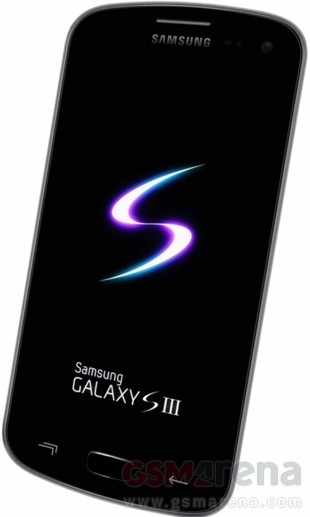
Alleged Samsung Galaxy S3 photo shows both physical and capacitive buttons


Another day, another "Next Galaxy" image, this time sent by one of our own tipsters, who claims this is the hotly anticipated Samsung Galaxy S3. Your guess is as good as ours whether this is a final version, some prototype, or something else altogether, concocted through image editing.

There is evidently a physical home key, as rumored, and two capacitive buttons, while the whole setup resembles a lot the render from the leaked early manual of a Samsung GT-I9300 Galaxy S3 that we saw yesterday. The side bezel of what seems to be quite a big display is pretty thin, but well leave the speculations on screen size aside, as we cant vouch whether this is the real deal anyway.


In fact, Samsungs VP Robert Yi all but confirmed the naming scheme yesterday at the quarterly results conference call with the slip of the tongue “We are anticipating very strong demand of Galaxy S3”, so at least that guessing game seems to be over now. What are your thoughts on this latest claimant to be the Galaxy S3?
Read More..

HTC ChaCha

The HTC ChaCha is a Google Android phone which ships Android 2.3 out of the box. It is a QWERTY messenger phone which combines a physical keyboard with a touchscreen. The display is a small 2.6-inch which has a high 480 x 320 resolution for a screen of this size, so fonts and images on the screen appear very sharp. 


QWERTY messenger form factor. If you are considering this type of phone, that is really the first issue you must resolve. Are you willing to give up screen real estate for a physical QWERT keyboard. Having shifted from a phone with a physical QWERTY keyboard six months ago, I have pretty much concluded that I will never be able to type as fast on a pure touchscreen phone as against one with a good old physical QWERTY keyboard. 

If your main purpose for a phone is calls, SMS, email, instant and social networking, this may be the best choice for you. If web browsing, ebook and document reading, photo editing and playing games is a main concern you are probably better off with a pure touchscreen phone with a larger (at least 3.2 inch) screen. Put simply, Angry Birds wont be as much fun on a 2.6-inch screen.

Hardware. The HTC ChaCha is nicely built with a metal bofy. The phone has a Arm v6 800MHz processor, 512MB of RAM and 512MB of ROM. The phone comes with a 2GB MicroSD card, and storage is expandable to 32GB. The hardware is more than sufficient for those who want a phone for voice calls, email and messaging and social networking. Arm v6, means it has limited rather than full flash support in the browser, and as we said earlier it is not really a good gaming platform. "Power users" would be better off looking elsewhere.

The phone has a 5MP auto focus primary camera with a LED flash and secondary VGA camera for voice chat and the like. The camera is decent but nothing to get excited about. Other phone with 5MP cameras, like the Samsung Galaxy Ace and the HTC Wildfire S snap better pictures.

Facebook button. The HTC ChaCha has plenty of character with the trademark Android chin distinguishing from the typical QWERTY phone and a dedicated Facebook button to launch the phone Facebook app on the chin. This is a nice phone from the standpoint of build quality, but no matter what you do, the first thing people will notice if the blue "F" on the body. It tells a lot about the user.

Similar phones. The HTC ChaCha can be found at a price of Php13,500 which puts it in the same price range as other  QWERTY messenger phones like the BlackBerry Curve 3G and is substantially cheaper than Nokia E6. Among these three options the HTC ChaCha is a much better choice than the E6. Hardware wise, it is a better choice than the Curve 3G. The Curve 3G would only be a better choice if you plan to avail of BlackBerry Internet, Messaging or Social Services.

Samsung also has its Galaxy Pro B7510 with similar specifications to the ChaCha and can be found at about 2K lower. The Galaxy Pro B7510 has a lower resolution screen, and its plastic case is less impressive than the HTC ChaCha. Basically, the Galaxy Pro B7510 is cheaper, but the HTC ChaCha is the better build phone. The Facebook button is just another "plus".

If you do want a QWERTY messenger phone, I think this would be the best choice for most users.

Acquisition options. Despite being a nicely build phone the HTC ChaCha is probably going to be a hard sell at its Php13,500. It is not the phone itself, it is QWERTY messengers in general. Most buyers will find the 3.2-inch pure touchscreen form factor of the HTC Wildfire or the 3.5-inch Samsung Galaxy Ace more appealing at this price range.

The HTC ChaCha becomes a really good deal on a postpaid line. SMART Communications is offering this phone free at Data Plan 1000, which gives you 100MB of data, 40 minutes and 100 SMS to all networks. The Wildfire S is offered at Unlimited Data Plan 1500 while the Galaxy Ace is offered by two carries at Plan 1800.

If SMARTs Data Plan 1000 fits your need, this becomes a very inexpensive and stylish option for keeping connection to your social networks.
Read More..

A fancy iPhone specifications

The latest types of iPhone 2012 specifications fancy


Continued video
Read More..

28 June 2012 Arrived in Sydney Kingsford Airport Australia

The flight is relative short and pleasant. To top it off we enjoyed a text book perfect landing!
This post sponsored by: Dr Mobiles Limited 
1 Huron Street, Takapuna, North Shore 0622 Tel: (09) 551-5344 and Mob: (021) 264-0000 Web - Map - Google+ - Email - Posterous -  Tumblr - Twitter - Blogger - Flickr -  Author 
Read More..

iPhone NEWS eyePlay Version 1 0 1

eyePlay Description eyePlay is a player for surveillance.
Read More..

Download Angry Birds Game for Windows 7 and XP

As you all know that Angry Birds is most popular game on mobile gaming platform and the latest news is the game available for download to play on windows xp, vista and windows 7 PC operating systems. But the bad news is the game is not free version to play, you must buy it from the online market at cheap price tag 4.99$. Even the  Angry Birds game has also been awarded with the best selling and popular game in 2010 year. And you also think how the game was got so much popularity from all over the world because the game was already launched on mobile devices like Android, iPhone and Nokia.

They have specially added some interesting new features for these Angry Bird game in order to entertain the gamers a lot because some users already played these game on other mobile platforms except PC platform.

Physics mechanism makes the game very reality to play, so the gamers will not feel boring when they playing the game constantly.

Newly added 255 levels and lots of different stages, each stage have unique strategy to kill all the pigs with one angry bird.

By Click the below link you can download the game from official site and you can also find free version  of these game on torrents and other file hosting server.

Download Angry Birds

Watch the Angry Birds Game play on PC
Read More..

Download Android 2 3 4 Gingerbread I9100XXKG1 XWKG1 for Samsung Galaxy S II I9100 Firmware Update leaked

The 2.3.4 Gingerbread update for Samsung Galaxy S II I9100 finally revealed on samfirmware.com.
Some devs and users expected that this firmware update version will fix battery drain issues on 2.3.3 and add some improvements to Galaxy S II. This is only a leaked version from samsung insiders, the official release hopefully will be soon pushed via KIES as they added.

This firmware update version is labeled with a build number I9100XXKG1 and dated July 5, 2011. Another 2.3.4 gingerbread will also be coming soon with a build number of  I9100XWKG1..

I9100XXKG1 details:
Phone - MODEM_I9100XXKG1_REV_02_CL1034110.tar
PDA - CODE_I9100XXKG1_CL349526_REV02_user_low_ship.tar
CSC - GT-I9100-CSC-MULTI-OXAKG1.tar
Country/ Languages
Cestina
Dansk
Deutsch (Deutschland)
Deutsch (Osterreich)
Deutsch (Schweiz)
English (Australia)
English (Ireland)
English (New Zealand)
English (South Africa)
English (United States)
English (United Kingdom)
English (Phillipines)
Espanol (Spania)
Espanol (Estados Unidos)
Estonian
Francais (Farnce)
Francais (Suisse)
Hrvatski
Icelandic
Irish
Italiano
Kazakh
Latviesu
Lietuviu
Macedonian
Magyar
Nederlands (Belgie)
Nederlands (Nederland)
Norwegian
Polski
Portugues
Romana
Slovencina
Slovenscina
Suomi
Svenska
Turkce
Russian
Korean
samsung galaxy S II I9100 android 2.3.4 gingerbread xxKG1
We cant say that the Android OS battery hog issue has been totally fixed. Android OS still shows a lot of usage. Android System process on other hand seems to have gotten down.
To those who want to give it a try, you can grab a copy at samfirmware.com
Download Link Stock XXKG1 : http://www.multiupload.com/2EMBQMYF4V (via ficeto)
Read More..

Galaxy Tab 10 1 P7510 WIFI Only P7510XXKFC Stock ROM with TOUCHWIZ

P7510XXKFC Honeycomb 10.1 (2011 June) a stock ROM released for Samsung Galaxy Tab 10.1 (WIFI) (EUROPEAN  version ). For those stuck on bootloops, bricked tabs or waiting to re-flash to stock firmware
Firmware update Enhancements:
Touchwiz
Task Manager
Polaris Office
Separate VIDEO app
App Dock
Photo Editor
Social and Music hub
Email with exchange support
Screen Capture Icon
Bigger Notification Panel with multiple switches
Settings: Mode(display), calibration, Fonts, wifi sync with kies,Power saving mode,Motion settings(tilting,panning for image zoom)


Continue on XDA-Developer thread for installation instruction:
Read More..

Harga HP Android Samsung Galaxy S Advance I9070 Processor Dual Core

Harga smartphone android Samsung Galaxy S Advance I9070 baru sudah tidak ada, bekas Rp 2.3500.000

Samsung Galaxy S Advance memang sudah cukup lama dirilis sejak april 2012 yang lalu. Sebagaimana ponsel kelas menengah lainnya, smartphone ini sudah dibekali dengan processor yang cukup cepat CPU Dual-core 1 GHz Cortex-A9. Soal OS anda juga santai saja, meskipun pada awalnya menggunakan android gingerbread, namun untuk sekarang ini anda bisa melakukan upgrade ke android jelly bean 4.1.2 yang baru.

Dari sisi harga yang hampir menyentuh angka tiga juta rupiah, terdapat dua smartphone samsung lainnya yang harganya kurang lebih sama. Smartphone tersebut adalah, Samsung Galaxy S III mini dan Galaxy S II.  Galaxy S III sepertinya memang cukup menarik dikarenakan oleh keluarnya lebih baru. Supaya lebih tau bagaimana komparasinya mari kita review satu persatu.

Harga handphone Samsung Galaxy S Advance I9070
Dilihat dari kualitas layar, antara S Advance dengan S III mini ini sama persis baik dari piksel densitinya, resolusi maupun besarnya ukuran layar. Yang menarik pada memori yang ada beberapa perbedaan dimana untuk RAM nya Galaxy Advance kalah besar tetapi lebih baik pada sisi memori internal. Kamera, baterai dan jaringan yang suport 3G kedua smartphone ini sama persis.

Samsung Galaxy S II dirilis pada bulan yang sama dengan S Advance. Harganya sekarang memang sedikit lebih murah dengan selisih beberapa puluh ribu saja. Secara umum dari spesifikasi yang ada pada ponsel pintar ini juga cukup berimbang.

Spesifikasi Samsung Galaxy S Advance I9070

JARINGAN
2G GSM 850 / 900 / 1800 / 1900
3G HSDPA 900 /1900 / 2100

LAYAR
Tipe Super AMOLED capacitive touchscreen, 16 juta warna
4.0 inch, 480 x 800 pixels, 233 ppi pixel density, Multitouch, Corning Gorilla Glass, TouchWiz 4.0 UI

UKURAN
123.2 x 63 x 9.7 mm / 120 gram

FITUR
Sistem Operasi Android OS, v2.3.6 (Gingerbread), upgradable to v4.1.2 (Jelly Bean)
CPU Dual-core 1 GHz Cortex-A9
Browser    HTML, A-GPS
Messaging: SMS(threaded view), MMS, Email, Push Mail, IM
Java via Java MIDP emulator
Stereo FM radio with RDS, SNS integration, Organizer - Image/video editor - Document editor - Google Search, Maps, Gmail, YouTube, Calendar, Google Talk, Picasa integration - Voice memo/dial/commands - Predictive text input (Swype)
Video Player MP4/DivX/WMV/H.264/H.263 player

MEMORY   
768 MB RAM
Internal 16 GB storage, 2 GB ROM
Eksternal microSD, up to 32GB

KOMUNIKASI DATA   
3G HSDPA, 14.4 Mbps; HSUPA, 5.76 Mbps
EDGE Class 12
GPRS Class 12 (4+1/3+2/2+3/1+4 slots), 32 - 48 kbps
WLAN Wi-Fi 802.11 a/b/g/n, DLNA, Wi-Fi hotspot
Bluetooth v3.0 with A2DP, HS
USB/Port v2.0 microUSB

KAMERA   
Primer 5 MP, 2592 x 1944 pixels, autofocus, LED flash
Sekunder 1.3 MP
Video Record 720p@30fps

AUDIO
Vibration, Audio Record, WAV ringtones, 3.5mm jack audio
Speakerphone, MP3 Player MP3/WAV/eAAC+/AC3/FLAC player

BATERAI
Li-Ion 1500 mAh
Standby Up to 570 jam (2G) / Up to 550 jam (3G)
Talk Time Up to 15 jam (2G) / Up to 7 jam (3G)
Read More..

iPhone NEWS Runners Interval Timer Review

If you regularly run interval workouts, chances are good you've already got
a Timex or Garmin wrist watch that'll not only remind you to change pace but
also monitor your heart rate, the distances you cover via GPS, and a host of
other relevant bells and whistles. But for people who are only just discovering
the joys (and pains) of interval training, the Runners Interval Timer app,
priced at just $1.99, is an awesome alternative to the aforementioned gizmos,
which typically run between $50 and $350.
Read More..

Sarkozy under pressure after Le Monde claims secret service spied on journalist

' Phone records of reporter covering Bettencourt affair were intercepted, judge
tells paper Nicolas Sarkozy is under pressure over yet another twist in the
Bettencourt affair after Le Monde newspaper said it had proof that the French
secret services had spied on one of its journalists to uncover his sources. '
Read More..

Navigating the Gnome 3 desktop for Linux

The new Gnome 3 desktop has become my favorite Linux desktop environment. Many in the Linux Community have give this desktop environment the thumbs down. Granted, it is the most radical change in the Linux desktop environment in recent history. I will leave the debates on this issue for another fora.

Lets just take a look at Gnome 3 on its own merit. When you first boot the computer you will be greeted by a very bare desktop.


To start getting work done you have to move  to the "Activities" view, which can be down by clicking the either "Activities" button, moving your mouse pointer to the top left edge of the screen, pressing the "Windows" key or pressing "ALT + F1".


Going to the Activities view will display a dock on the left side of the screen where you can pin your favorite programs. On the right side it displays the work-space switcher, and this view will also display open Windows. Right now we dont have any.

I think it might have been better if this was the default view for Gnome 3. The bare home screen can be a source of confusion at first. Maybe the Gnome Team plans to put widgets on the home screen in the future, so lets see how this plays out.

You can launch applications from the dock on the right side on the right side of the screen, but to view all installed applications you have to click the "Applications" button at the upper left section of the "Activities" view.


You can  scroll up and down the screen to find the application you are looking for or select the particular category of apps you want to view.


I think this feature will be removed from the next version of Gnome 3.

Lets launch a few applications to see what "Activities" view looks like.


You can switch between open windows from this view by clicking the one you want to bring to the front. Each instance of each app is displayed separately. I will open to documents to show you what it looks like.

 
You can also switch between Windows using the "Alt + Tab" keyboard shortcut.


There is something is the "Alt + Tab" which some user might not like. When you have two instances of the same application it aggregates them in the "Alt + Tab" view. This would mean having to use the "Alt+Tab" keyboard shortcut and without releasing these keys navigate to the the desire Window using the arrow keys on the keyboard.  

I never use work spaces, but if you do, they are on the right side of the screen.


Accessibility options, volume controls, Bluetooth and wireless and other functions can be accessed through drop down menus at the top right of the screen.


Well, that is all for now. If there are other parts of the Gnome 3 desktop you would to see, leave a comment. 
Read More..

iPhone 6 AT T 4G Network Tops At 28 87 Mbps iOS Vlog 409 Explanation video


Explanation video ..iPhone 6 AT&T 4G Network Tops At 28.87 Mbps - iOS Vlog 409


GigaOM got a chance to try out a demo of AT&Ts 4G Network that should be making its debut sometime next year. The new 4G network making its way onto the market and to consumer phones has topped just above 28 Mbps download and about 10-11 Mbps upload speed. If want to compare, Verizons network currently supports about 10 Mbps down and 5 Mbps up, still speedy, but not speedy enough. We should expect an iPhone 6 to release next year as well running this blazing fast 4G on both networks, but of course, only one will be faster

Read More..

Is this the first legit Samsung Galaxy S3 press shot


So far Samsung has been keeping its next flagship under wraps quite successfully. Weve only seen blurry shots of the externals and supposedly, those are not even the final designs.

Props to Samsung for their success so far, but could this be the first serious leak of the handset?

What we have on our hands today is an image that looks a lot like what the Samsung Galaxy S3 is supposed to look like, judging by some of the more substantial leaks from the past.

Update: The image is confirmed as old and has surfaced before. Its certainly a mockup. Sorry about that, move along.

Now this photo didnt come with any extra info on the handset, but the leaked specifications for the device so far detail a 4.6 or 4.8-inch SuperAMOLED screen of 720p resolution, Samsungs latest quad-core Exynos chipset, and an 8 or 12 megapixel camera to go with those. There should also be an extra beefier battery to make the phone last a bit longer.
Now as usual, take this thing with a pinch of salt. But our guess is leaks wont get any better than this before the official announcement. Even if its some user-land fan art, we still appreciate the effort and its a job nicely done.

Read More..

Boxing Game Ali vs Tyson Apk Android Game

download game untuk android : Boxing Game (Ali vs Tyson) Apk
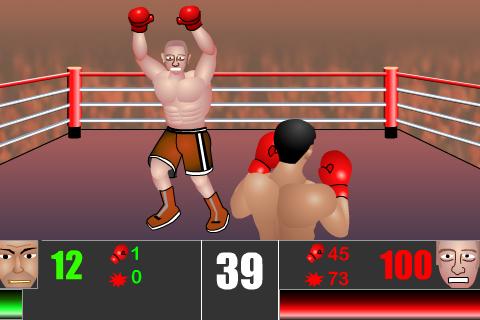
game android yang lucu dan keren, ya game tinju untuk android ini memang sangat menyenangkan meskipun tampilan grafis yang tidak terlalu baik namun setidaknya kita bisa memainkan tinju di hp android.

game tinju ini sejatinya hanya menampilkan 2 petinju legendari yaitu Moch Ali dan mike Tyson
bagaimana cara bermainnya, gampang dan sederhana, anda hanya perlu tap sekali untuk tiju, dan tap 2 kali dengan cepat untuk meninju lawan dengan berurutan.

download Boxing Game (Ali vs Tyson) Apk Android Game
latest update : new version | mediafire | descargar | galaxy mini
support Android : android 1.5 cupcake, android 1.6 donut, android 2.0 / 2.1 eclair, android 2.2 froyo, android 2.3 gingerbread, android tablet 3 honeycomb, android 4 ice cream sandwich or above
download

Boxing Game (Ali vs Tyson) Apk Android Game


Boxing Game
TAKE DOWN YOUR OPPONENTS NOW!
Dodge, jab and brawl with intense arcade-style boxing!Start in the amateur circuit and work your way up to pro, meeting your opponents along the way. Max out your hits and try for a super KO-combo.
Take down your opponent in 100 secs or youll lose the game!

HOW TO PLAY:
TAP to throw punch.
TAP quickly to create super combo.
disclaimer: if this app is not FREE, please buy in android market or visit developers website
Please support the developers if you like their app.
tags : samsung galaxy, game android: lair defense, app, apps, support android phone: hp, ponsel, seluler, cell, samsung galaxy, young, ace, mini, s 2,sony mobile, nokia, sony ericsson xperia, x10, x8, motorola, LG, HTC, droid, nexus, s, nexian, zte, htc and all android phone, boxer - ali apk donwload
Read More..

iPhone NEWS Ball Up ! Version 1 0 0 0

Ball Up ! Version 1.0.0.0

Ball Up ! Description Ball Up! is a kind of game that you start to love when you see it;) You choose your favourite ball and collect gems by sensible tapping that ball. Longer you tap higher it pops.

Read more:
Ball Up ! Version 1.0.0.0


Read More..

Perfect Piano 5 1 Apk Aplikasi Android

download Perfect Piano 5.1 Apk Aplikasi Android
lagi suka bermain main dengan alat musik simulasi untuk android, kali ini Perfect Piano 5.1 Apk melengkapi postingan sebelumnya tentang Solo Guitar Android, dan Real Drum - aplikasi untuk belajar bermain drum di hp Android

fitur dan cara bermain Perfect Piano
Gunakan aplikasi ini untuk mempelajari secara akurat notes dari piano dengan suara piano realistis menyerupai aslinya.
  • Dukungan Keyboads Penuh Piano.
  • Tunggal Row Mode.
  • Ganda Row Mode.
  • Multi-Touch (Android 2.1 atau lebih tinggi).
  • mendeteksin sentuhan tekanan.
  • Rekam dan Putar
  • Kunci lebar penyesuaian
  • mode Belajar bermain (tersedia 70 contoh lagu)
  • Berbagi rekaman permainan piano anda. Impor - Ekspor ke memory SDcard.
  • Belajar untuk memainkan lagu sampel didownload.
Perfect Piano 5.1 Apk Aplikasi Android
latest update : new version | mediafire | descargar | galaxy mini
support Android : android 1.5 cupcake, android 1.6 donut, android 2.0 / 2.1 eclair, android 2.2 froyo, android 2.3 gingerbread, android tablet 3 honeycomb, android 4 ice cream sandwich or above
download

Perfect Piano 5.1 Apk Aplikasi Android


Perfect Piano 5.1 Apk Aplikasi Android
Piano , master , perfect , pro, professional

disclaimer: if this app is not FREE, please buy in android market or visit developers website
Please support the developers if you like their app.
tags : aplikasi android samsung galaxy, game, app, apps, support android phone: hp, ponsel, seluler, cell, samsung galaxy, young, ace, mini, s 2,sony mobile, nokia, sony ericsson xperia, x10, x8, motorola, LG, HTC, droid, nexus, s, nexian, zte, htc and all android phone
Read More..

June 2011 Smarthpone buyers guide Part I

A bit late in the month, but we wanted to wait to complete the dual core cast. We normally start with the most expensive, this time we will go the reverse order and think that will be a more helpful guide.

10K or less. These days Php10,000 gets you a lot. You can a brand new BlackBerry with a two year warranty, a Nokia Symbian smartphone with free turn by turn navigation. What else. Well there are Samsung Bada phones.There are also a whole gaggle of Google Android available.

There are no good reasons to get a Bada phone.  If you plan to avail of BlackBerry services, stop reading this guide and get the BlackBerry which fits your budget. Each step price increase of higher end models brings useful features worth paying for. If you are looking for the best free navigation option for the Philippines, Nokia with their OVI maps provides that. Other than that, we recommend that you get the LG Optimus One P500.

LG Optimus One: Best option below 10K

Why? If you are in the market for a modern touchscreen phone you want one with a touchscreen friend OS.  This means you should be looking at an Apple iOS, Windows Phone 7 or Google Android device. At 10K or less, the only available options at this price, are Androids. 

Since touchscreen is the order of the day, get the highest resolution device available and in general the larger the screen the better. At below 10K, most Android run 240 x 320 screens resolutions, which looked pixelized even on small screens. There are two options that run the higher 320 x 480 (same as an iPhone 3GS) resolution. You have Sony Ericsson X8 and the LG Optimus One P500.

The Sony Ericsson Xperia X8 is now an obsolescent product forever to be stuck at Android 2.1, so I suggest you pass on this one. LG Optimus One P500, is running Android 2.2, with a promised upgrade to Android 2.3 on the way. The Optimus One also has a larger screen (3.2-inches), more RAM and a larger battery than the Xperia X8. So the Optimus One beats the Xperia X8 in both software and hardware.

What about all the other sub-10K Androids. We do have the LG Optimus Me, the Samsung Galaxy 5, Mini and Fit, and a few months ago, we would were recommending phones with these specifications. A few months is a long time in the mobile phone industry, and we really wont be recommending anything with a screen resolution lower than 320 x 480 anymore. 

The LG Optimus can be had for as low as Php9,800 with an official warranty. Sure, you can save 1-2K on a lower end unit with a lower resolution screen. The cost will be app compatibility. A 320 x 480 resolution will give you better app compatibility, and over time more and more newer apps wont run or run efficiently on 240 x 320 screens. Android phones with 240 x 320 screen resolutions are on the way out. Now is not the time to buy one of this anymore. 

10-15K range. Adding Php5,000 opens up a whole bunch of new interesting choices. 

HTC Wildfire S: Premium look and feel, but a bit short on specs

The HTC Wildfire S is available for as low as Php13,000 with an official HTC warranty. The question is, is it worth 3K more than the LG Optimus One. Both phones have 3.2-inch, 480 x 320 screens, 600MHz processors with Adreno 200 graphics, and 512MB of RAM. The HTC does have a more premium looking case, a Gorilla Glass protected display and a LED flash for the camera. So the HTC is a step up in hardware. 

From a software standpoint the Wildfire S comes out of the box with Android 2.3, has the HTC Sense interface (which in our opinion is the best manufacturer customize Android interface) and has flash support in the browser (but not full browser flash support). Really, the only good reason to get this phone at this price range is if you want the Sense UI. If not, the LG Optimus One P500 offers better value for money and Samsung has something that is a better value for money option at this price bracket.

Samsung Galaxy Ace: The best choice under 15K

The Samsung Galaxy Ace, priced at Php13,500 with an official Samsung warranty is a notch up in price over the LG Optimus One P500 and offers hardware well worth the price difference. Instead of a 3.2-inch screen, you get a larger 3.5-inch screen protected by Gorilla Glass. The processor in the Galaxy Ace is a 800MHz unit, faster than the 600MHz processor in the Optimus One. The Galaxy Ace also comes with the best still camera at this price range.

In the end, you buy this for the 3.5-inch screen. That is the same size as the screen on an iPhone, and for many may be the best compromise between a large screen and a small form factor. It does not sound like a big difference, but when you compare a 3.5-inch screen with a 3.2-inch screen phone side by side, the difference is larger than it sounds since the size is measured diagonally.

Part two of this guide can be found at this link.

Read More..

iPhone NEWS Men’s Hairstyles Version 2 0

'Men's Hairstyles Version 2.0'

Mens Hairstyles Description Men's Hairstyles is the first app that allows
you to try on over 240 different men's hairstyles, beards and mustaches to see
what you look like. See what you look like with a mustache, beard or soul patch.
All REAL hairstyles.

Read More..

iPhone NEWS People Who Deleted Me On Facebook Version 1 2

People Who Deleted Me On Facebook Description FOR ALL OUR CUSTOMERS WHO HAVE
PROBLEM WITH THIS APP !! IF YOU HAVE INSTALLED ON YOUR IPHONE/IPAD OFFICIAL FREE
FACEBOOK APP.
Read More..

iPhone NEWS Rumor Sprint Will Offer Unlimited Data Plan with iPhone 5

'Rumor: Sprint Will Offer Unlimited Data Plan with iPhone 5'

Bloomberg is reporting that, according to their sources, Sprint will offer an
unlimited data plan with along with the iPhone 5 next month.

Read More..

GO SMS Pro 4 33 Apk Samsung Galaxy Mini Messaging

download GO SMS Pro 4.33 Apk | Samsung Galaxy Mini Messaging

GO SMS Pro GRATIS adalah aplikasi messaging yang paling populer untuk Android, peningkatan besar untuk SMS , jauh lebih cepat, lebih banyak fungsi, pengaturan, dukungan SMS / MMS / GO Share / GO Chat / Facebook Chat, Sertakan SEMUA yang Anda inginkan untuk texting sms. HARUS MEMILIKI.

GO SMS Pro v4.33 Apk | mediafire download | Size : 4.7 MB
Requires Android:1.6 and up | samsung Galaxy Mini

GO SMS Pro 4.33 Apk | Samsung Galaxy Mini Messaging

GO SMS Pro 4.33 Apk | Samsung Galaxy Mini Messaging

★ Features
-- Full SMS/MMS support
-- GO Share service, send file through 2G/3G/4G or WIFI or by one SMS
-- GO Chat/Facebook Chat support
-- Doodle, Handwriting
-- Private box
-- Schedule SMS
-- Batch modes
-- Popup with quick reply, privacy mode
-- SMS backup and restore by all or by conversations, can be sent to email
-- Many cool themes; also DIY theme, Theme Maker plug-in;
-- Fully customizable look; Supports chat or list style; Font changeable
-- Security lock, support lock by thread; Blacklist
-- Support GESTURE, left/right slip, many transition effect
-- Support Emoji with Emoji pulg-in
-- Settings backup and restore
-- Facebook contact photo support
-- Group texting
-- Notification with privacy mode and reminder notification
-- Support folders view: Inbox, Outbox, MMS, created folders, encrypt folders
-- Individual customization for Notification , Signature and Conversation
-- 1x1 icon widget with message count and 4x2 medium widget
-- Support many languages
-- Online SMS lib
-- Handy, build-in Contacts
-- Night mode
-- Stock SMS can be removed (but please be care)
-- Split large messages for CDMA
-- Time offset adjustment
-- Avoid disordered messages: sort by time or by order of msg sent/received
-- Localization support for accented chars: by enabling Czech, Polish and French SMS mode
-- Quick text management
-- Messages grouping (Group mode or Separate mode)

GO SMS Pro 4.33 Apk | Samsung Galaxy Mini Messaging
Download go sms
Read More..

Solution How to fix Deodexed System Browser Samsung Galaxy S II I9100 and Galaxy S I9000

Thanks to a genius guy brightidea from XDA-developer who found the fix for the laggy browser bug for Samsung Galaxy S II  after deodexing, the Browser wont work correct. If you want to scroll or zoom in browser it lags and dont shows the right content.

This solution is guaranteed to work as long as the order of class fields mLeft and mTop are the same in android/view/SurfaceView.smali as android/webkit/WebViewCore$ShowRectData.smali.


"I found the bug for real this time - unfortunately, its in smali.jar. and you were right. The fault occurs when it attempts to build framework.jar from smali files
specifically this file "android/view/SurfaceView.smali

But I have a work-around (guranteed to work as long as the order of class fields mLeft and mTop are the same in android/view/SurfaceView.smali as android/webkit/WebViewCore$ShowRectData.smali)"

Brightidea spend a lot of time and effort in order to reach this solution and according to him that his eyes burn like hell and my wife wont talk to him anymore while reaching this solution.

You may visit his XDA thread to give him a full compliments for this very useful solution.
http://forum.xda-developers.com/showthread.php?t=1208071&page=2

How to fix deodexed System/Browser Samsung Galaxy S JVR JVQ
This solution is modded by lirik0 for Samsung Galaxy S I9000 after been found out by Brightidea.
http://forum.xda-developers.com/showthread.php?t=1212796

Read More..

Harga HP Android Samsung Galaxy Mega 5 8 I9152 Dual GSM

Harga handphone android jelly bean Samsung Galaxy Mega 5.8 I9152 Dual GSM baru Rp 3.800.000 dan yang bekas Rp 3.400.000

Dilihat dari sisi harganya Galaxy Mega 5.8 ini lebih murah sekitar satu jutaan dibandingkan dengan Samsung Galaxy Mega 6.3. Yang menarik dari fitur mega 5.8 adalah ketersediaan dual sim GSM tetapi untuk beberapa spek lainnya memang sedikit diturunkan. Penurunan spek ini diantaranya adalah pada resolusi layar, pixel density, frekuensi processor, kapasitas memori internal dan baterai.

Dari semua produk handphone android samsung yang ada memang tidak ada harga yang setara dengan Galaxy Mega 5.8 karena selisih di atas maupun dibawahnya mencapai lima ratus ribuan. Untuk mencoba membandingkan dengan produk yang lain maka kita lihat saja apakah Mega 5.8 ini dengan harga yang lebih rendah bisa sama atau paling tidak mendekati smartphone di atasnya.

Untuk urusan jaringan tentu saja smartphone dengan harga segini sudah pasti terdapat jaringan 3G. Biasanya yang berbeda adalah pada processor, kamera, software, maupun memori dan baterai yang menjadi harware kunci dan jadi pertimbangan kita dalam membeli.

Harga handphone android Samsung Galaxy Mega 5.8 I9152
Sebagai handphone yang baru saja direlease pada pertengahan tahun 2013 tentu saja OS yang dipakai adalah yang terbaru yakni Jelly Bean versi v4.2.2. OS ini sudah sama dengan hape kelas atas lainnya seperti misalnya Samsung Galaxy S4 Mini.

Processor yang digunakan adalah CPU Dual-core 1.4 GHz dengan kemampuan sangat baik. Kualitas ini bahkan lebih baik dibandingkan galaxy beam yang lebih mahal. RAM sebesar 1.5 GB, memori eksternal 64 GB dan internal 8 GB sudah lebih dari cukup untuk saat ini.

Kamera 8 MP dengan kamera sekunder (depan) 1.9 MP memang sudah menjadi standard di kelas menengah-atas ini. Gambar yang dihasilkan sudah sangat baik belum lagi kemampuan merekam videonya juga sudah HD dengan kemampuan  1080p@30fps.

Spesifikasi Samsung Galaxy Mega 5.8 I9152 Dual GSM

JARINGAN
2G GSM 850 / 900 / 1800 / 1900 - SIM 1 & SIM 2
3G HSDPA 850 / 900 / 2100

LAYAR
Tipe TFT Capacitive touchscreen, 16 juta warna
5.8 inch, 540 x 960 pixels, 190 ppi pixel density, Multitouch, TouchWiz UI

UKURAN
162.6 x 82.4 x 9 mm / 182 gram

FITUR
Sistem Operasi Android OS, v4.2.2 (Jelly Bean)
CPU Dual-core 1.4 GHz Sensors Accelerometer, gyro, proximity, compass
Browser HTML5
Dual SIM (Micro-SIM)
GPS with A-GPS support and GLONASS
Messaging: SMS(threaded view), MMS, Email, Push Mail, IM, RSS
Java via Java MIDP emulator
SNS integration - Organizer - Image/video editor - Document viewer - Google Search, Maps, Gmail, YouTube, Calendar, Google Talk, Picasa - Voice memo/dial/commands - Predictive text input

AUDIO
Vibration, MP3 dan WAV ringtones
3,5 mm Jack Audio, Speakerphone, Audio Record
Video Player MP4/WMV/H.264/H.263 player
MP3 Player MP3/WAV/eAAC+/AC3/FLAC player

MEMORY
1.5 GB RAM
Internal 8 GB storage, 
Eksternal microSD, up to 64 GB

KOMUNIKASI DATA
3G HSDPA, 21 Mbps; HSUPA, 5.76 Mbps
EDGE
GPRS
WLAN Wi-Fi 802.11 a/b/g/n, dual-band, Wi-Fi Direct, Wi-Fi hotspot
Bluetooth v4.0 with A2DP, LE
USB/Port microUSB v2.0

KAMERA
Primer 8 MP, 3264 x 2448 pixels, autofocus, LED flash, Geo-tagging, touch focus, face and smile detection
Sekunder 1.9 MP
Video Record 1080p@30fps

BATERAI
Li-Ion 2600 mAh battery
Read More..

AutoPlus for Fedora Linux


I decided to try out Fedora 15 Linux this weekend, mainly because I wanted to try out the new Gnome 3 interface. I manages to install the additional software I needed (Libre Office and GIMP) easy enough in the terminal. I installed drop box the "Windows" way, download and click next. After a fair amount of difficulty I managed to get the Adobe Flash plugin installed. 

Google Earth was proving to be a problem. After doing some search I found an application called AutoPlus that makes it easier to add commonly used plugins and apps in Fedora Linux. 


Looks like it could have saved me a lot of time installing flash too. Just in case you are trying out Fedora Linux, give this app a look. You can find more information at this link.
Read More..

App developers beware your days could be numbered

The recent release of iOS 5, Apple latest version of its software for its iDevices should serve as a warning to some app developers.Your days could be numbered. 

iOS 5 includes Siri and iCloud. Siri is a virtual assistant application developed by SRI International, which is now is owned by Apple. Siri Competitors like Vlingo probably have little chance against a pre-installed, free and Apple supported SIRI. iCloud is the name for a combination of Apple provided Cloud services. Dropbox and Box.net should find fewer customers in the iOS world. iOS 5 also integrates Twitter... in time Facebook and other social networking sites might also be more deeply integrated. Apple is looking to go into movie streaming. 

Actually, this is nothing new. Windows Phone 7 already features voice commands, cloud services and social networking integration out of the box. With Windows Phone 7, the operating system is the super app. Google Android developers have to compete with Google apps, which include Voice Actions and Google extensive array of cloud services. Google even has its own social networking site Google+. Google is now starting its own music service.

While the popularity of mobile phone platforms has been driven by the number of apps created for each platform, with each passing year, mobile operating systems are making productive third party apps less necessary. I think we are just two years from the day when most non-integrated apps will be games and trivial entertainment related apps. 

Googles Android is likely to be the most open, which will allow third party developers to compete. An  app developer having to compete with Google is not a ideal situation. Microsoft Windows Phone 7 while more controlled in nature, is on several hardware platforms with know specifications, so third party app developers can stay in the game. Still do they hold a tight reign on their app market. Competing with Microsoft is not going to be all that much fun. Apple developers. Well they really better look at their future. Apple controls both their software and hardware, and even has complete control on app distribution. Apple app developers who are into projects that Apple is interested in, better how that Apple will buy them out. You really wont be able to compete with Apple.   

Read More..

Blog Archive

Diberdayakan oleh Blogger.